 |
An Access Database is available on demand.
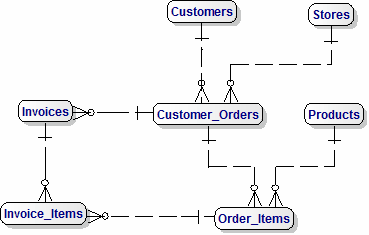
This Model is based on our Canonical Data Model.
There is also a design for a Data Mart which is an excellent start for Enquiries and producing Reports.
If you are new to Data Models, this page of my new Tutorial will help you understand the Data Model.
This is an 'Easy to understand' version showing only the Entity names.
There is also a Data Model showing Attributes, and one showing
Reference Data
and one showing the exact details of
tables in the SQL Scripts.
There is also a design for a Data Mart, which is very useful for providng data for Reports and Business Intelligence.
|
A) Produce the Database using the Data Model with Attributes
- Create and load Data into the Reference Data Tables (beginning with 'REF_').
- Create the Stores Table.
- Create the Customers Table.
- Create the Products Table.
- Create the Customer�_Orders Table.
- Create the Order_Items Table.
- Create the Invoices Table.
- Create the Invoice�_Items Table.
B) Use Oracle Apex to generate Data Entry Pages and load data for all the Tables listed above.
C) Generate Apex Pages for the following functions :-
- Add Standard Reports - Total Sales by Customer, Product (Drill-down by Product) , Store and Time-Period.
- Add Invoice Printing
- Add multiple Currencies
- Add Export handling
- Add One-off Payments (incoming or outgoing, such as Insurance Payments for Claims)
- Add Recurring Payments (eg regular Orders or Insurance Payments)
- Add Document management
|
Barry Williams
Principal Consultant
Database Answers Ltd.
London,England
November 15th. 2013
|


 Printer-friendly version